

First-time setup
New recipients need to complete a one-time onboarding before funds are released:- Accept the payment invitation
- Create or log in to your Karat account
- Complete onboarding and submit tax forms if required by the payer’s collection setting
- Choose how you want to be paid
Payout methods
Available methods depend on your location. Domestic (U.S.) recipients:- Karat account
- ACH bank transfer
- PayPal
- Crypto
- International bank transfer (through local banks)
- SWIFT wire transfer
- PayPal
- Crypto
Choosing crypto
If you select Crypto as your payout method, you’ll be asked to choose a cryptocurrency and provide a wallet address. Supported cryptocurrencies:- USDC (USD Coin) on the Ethereum network (ERC-20)
- USDT (Tether) on the Ethereum network (ERC-20)
- Select the cryptocurrency you’d like to receive (USDC or USDT).
- Enter your Ethereum (ERC20) wallet address. The address must start with
0xand be 40 characters long. - Review your details and confirm.
Always double-check your wallet address and network before submitting. Sending funds to an incorrect address or unsupported network can result in permanent loss of funds. Karat cannot recover crypto sent to the wrong destination.
Choosing SWIFT wire transfer
If you select SWIFT wire transfer as your payout method, you’ll need to provide:- Beneficiary type: whether you are an individual or a business
- Your full legal name (up to 35 characters)
- Your address (street, city, and country)
- Your bank’s SWIFT/BIC code (8 or 11 characters)
- Your bank account number
- An optional routing number
- Verified: you passed compliance checks and can receive transfers.
- Pending: verification is still in progress. Payments sent to you will be held until verification completes, then released automatically.
- Disabled: you did not pass compliance checks and cannot receive transfers via SWIFT. Choose another payout method.
Pending payment alerts
If you have unclaimed payments, a banner appears at the top of your dashboard showing the number of pending payments, who sent them, and the amount. Click Accept now to start or resume the acceptance flow. The banner picks up where you left off. If you already completed your tax information, you’ll skip straight to choosing a payout method. If you’ve already set up a payout method, you’ll go directly to the review step.The banner appears on every page of your dashboard until all pending payments are accepted.
Future payments
After your first payment from a sender, your payout method is saved for that sender and future payments from them are processed automatically. You can update your method at any time from your Payments Dashboard.Receiving payments from multiple senders
Payout methods are saved per sender. If you start receiving payments from a new organization, you’ll be asked to choose a payout method for that sender the first time, even if you’ve already set one up with another sender. This lets you route payments from each sender to a different account if you want. Your tax information is shared across senders. Once it’s approved with Karat, you won’t need to resubmit it for new senders.ACH payout corrections
If you’re paid by ACH and the receiving bank reports corrected routing or account details for a completed payment, Karat automatically disables the affected bank account on your payout method so future payouts aren’t sent to outdated details. You’ll receive an email with a link to the payment method update flow so you can reconnect the account. Other payout methods you’ve saved, and other bank accounts linked to different payers, are not affected.Managing your payments
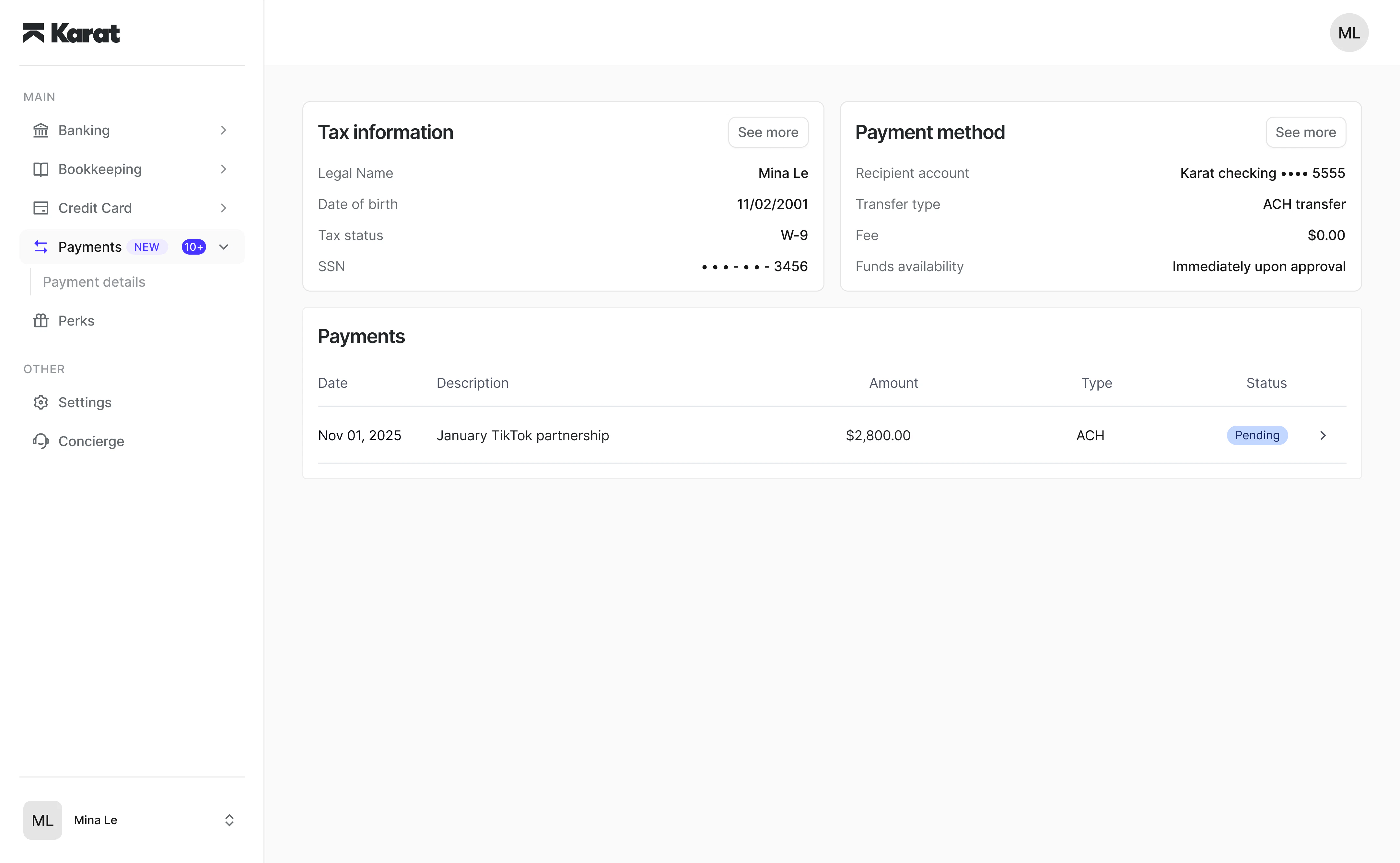
From your Payments Dashboard, you can:- View payment history
- Update payout methods
- Under “Payment method” click “See more” and edit your primary payment method.
- Manage tax information
- Download tax documents
Downloading a payment receipt
You can download a PDF receipt for any payment you’ve received. The receipt includes the payment amount, transfer details, and a Reference ID, and is useful for recordkeeping or sharing proof of payment with a third party. To download a receipt:- Open the Received tab on your Payments dashboard
- Select a completed payment to open the payment details
- Click Download receipt (PDF)