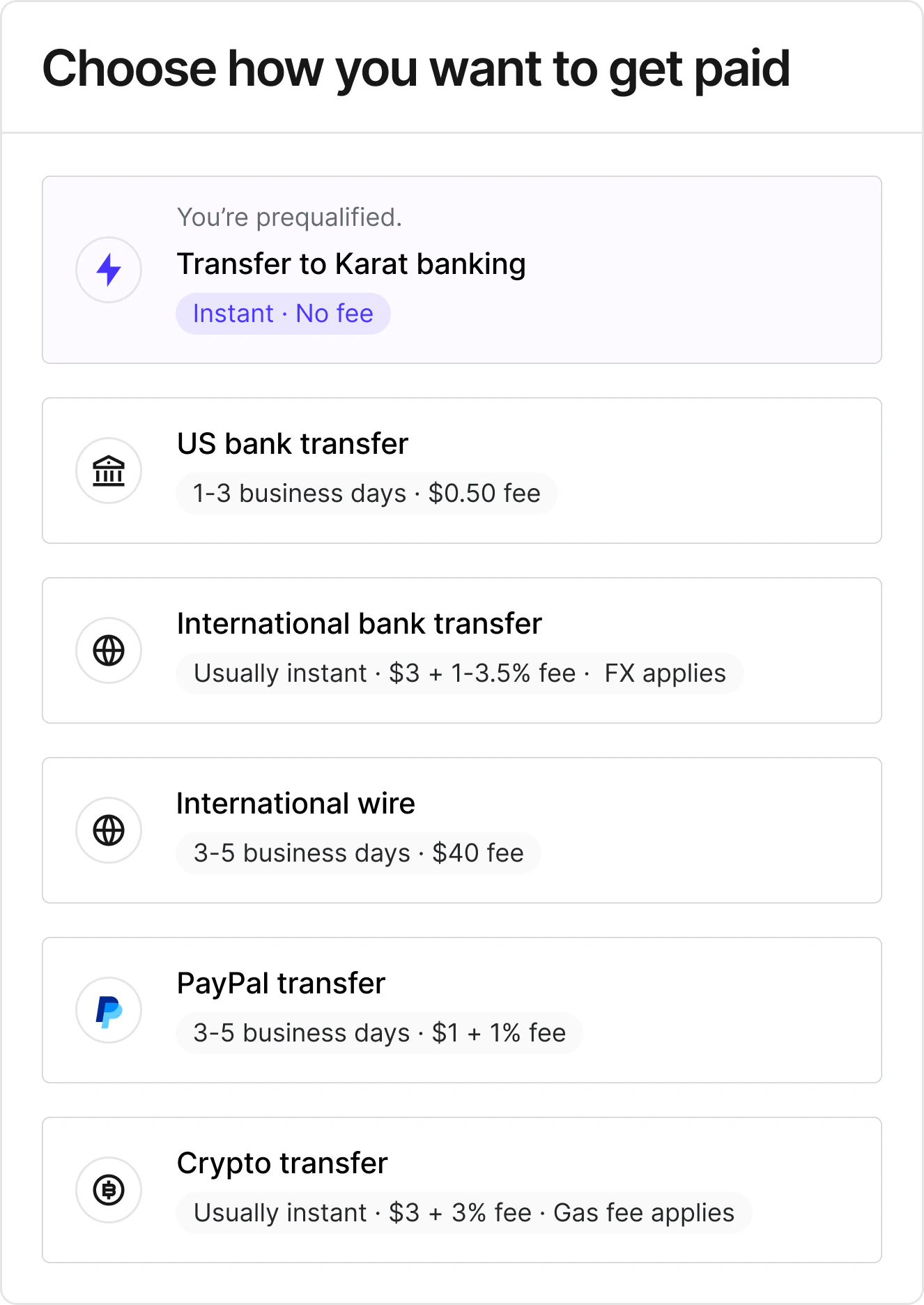
Karat Payments fees by payout method, and how to choose whether the sender or recipient covers the fee, including ACH’s sender-paid default.
Fees depend on the payout method selected. For most methods, fees are
paid by the recipient by default and deducted from the payment amount.
You can change this so your organization covers the fee instead. For
ACH, the default is that your organization (the sender) pays the fee.The exact fee for each method (including any fixed amount, percentage,
and who pays) is shown to recipients when they choose how to be paid,
based on your organization’s settings. If your organization covers the fee
for a given method, recipients won’t see fee text for that method when
selecting it.
The SWIFT wire transfer fee is deducted from the payment amount before the
transfer is sent when the recipient pays. This means the recipient receives
the payment amount minus the fee. The exact fee is shown before the
recipient confirms their payout method. If the payment amount is too small
to cover the SWIFT fee, the recipient must choose a different method.Fees may vary by country. There is no cost to recipients for tax form
generation.
For international bank transfers, the percentage portion of the fee is built into the exchange rate shown to the recipient rather than listed as a separate fee line. The displayed exchange rate is the rate used to convert the payment, after the FX fee is applied. Compare it to the current market rate to see the effective cost.
Crypto network (gas) fees are always paid by the recipient, regardless of the fee handling setting.
For each payment method, you can choose whether the fee is paid by the
recipient or by your organization (the sender). This is configured per
payment method in
payment settings.
Setting
Behavior
Recipient pays
The fee is deducted from the payment amount. The recipient receives the payment minus the fee.
Sender pays
The fee is charged on top of the payment amount. The recipient receives the full payment, and your account is debited for the payment plus the fee.
The default depends on the payment method:
ACH defaults to Sender pays for new setups.
All other payment methods default to Recipient pays.
Existing configurations are unchanged until you edit them.To change who pays the fee:
Use the Who pays the fee dropdown to select Recipient pays or
Sender pays
The change takes effect for all future payments using that method. You can
update this setting at any time.When you send a batch payment with sender-pays-fees enabled, the fee for
each recipient is shown in the Fees column on the confirmation screen.
The batch total includes both the payment amounts and any fees your
organization covers.
ACH is always available as a payout method and can’t be turned off from
payment settings. The availability toggle next to ACH is locked on, but
you can still change who pays the ACH fee at any time using the
Who pays the fee dropdown.Karat is a fintech company, not an FDIC-insured bank. Banking and Card services provided by Grasshopper Bank, N.A., First Internet Bank of Indiana, and Cross River Bank, Members FDIC.
Assistant
Responses are generated using AI and may contain mistakes.