You can schedule, edit, or cancel recurring transfers directly from your Banking dashboard.

Set up a recurring transfer

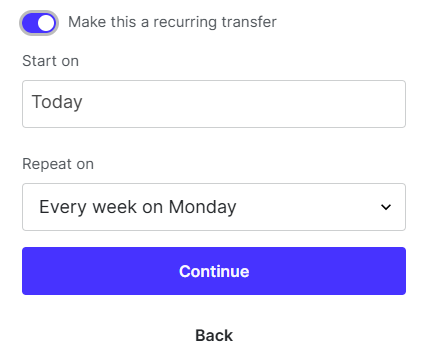
Navigate to Banking > Move Money > Send Money. Choose your transfer method (Karat transfer, internaitonl transfer, ACH transfer, domestic wire) Enter the recipient and transfer details. Before confirming, toggle Make this a recurring transfer. You’ll be prompted to select a start date and choose how often the transfer should repeat. Recurring transfers can be scheduled daily, weekly, monthly, or on a custom cadence. Review the details and confirm. The transfer will process automatically based on your selected schedule.
Image

Edit or cancel a recurring transfer

To manage an existing recurring transfer, go to Settings > Banking > Manage recurring transfers. From there, you can update the amount, frequency, or next transfer date, or cancel the recurring schedule entirely. Changes apply to future transfers only. Recurring transfers must have sufficient available balance at the time of processing. If funds are unavailable, the transfer will not be completed. Karat is a financial technology company, not a bank. Banking services provided by Grasshopper Bank, N.A., Member FDIC. The Karat Visa® Business Credit Card is issued by Cross River Bank, Member FDIC, and pursuant to a license from Visa️ USA.